Physical Address
304 North Cardinal St.
Dorchester Center, MA 02124
Physical Address
304 North Cardinal St.
Dorchester Center, MA 02124

In the modern era of flexible work schedules, remote jobs, and bustling households, the computer has become the central hub of our daily productivity. Whether you are managing spreadsheets, attending endless Zoom calls, running a small business, or just browsing the web on the couch, having the right machine is crucial.
This brings us to the classic technological stalemate: the laptop vs. the desktop computer.
Twenty years ago, the choice was easy. If you needed power, you bought a desktop. If you needed to move, you bought a heavy, underpowered laptop. Today, the lines are blurred. Laptops are incredibly powerful, and desktops have become sleeker and more accessible.
Choosing between them isn’t just about specs; it’s about matching the tool to your lifestyle and workflow. This guide will dive deep into the pros and cons of each to help you determine which is the ultimate choice for your home and office needs.
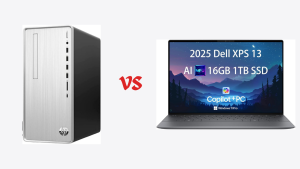
For decades, the desktop PC has been the undisputed king of the office cubicle. While it lacks mobility, it makes up for it in sheer capability, value, and long-term viability.
When we talk about desktops for “home and office,” we generally refer to two types: the traditional tower (which connects to a separate monitor, keyboard, and mouse) and the All-in-One (AIO), where everything is built behind the screen.
1. Superior Performance-to-Price Ratio Dollar for dollar, a desktop will almost always outperform a laptop. Because manufacturers don’t have to shrink components to fit into thin chassis or worry excessively about battery drain and heat dissipation, they can use full-sized, full-powered processors and graphics cards. If your office work involves heavy multitasking, large databases, or light video editing, a desktop offers more “grunt” for less money.
2. Unlimited Upgrade Path and Lifespan This is the desktop’s greatest strength. If your tower desktop starts feeling slow in three years, you don’t need to replace the whole machine. You can simply open the case and add more RAM, swap in a faster SSD, or upgrade the graphics card. This modularity means a well-built desktop can remain relevant for 5–8 years, whereas a laptop usually has a 3–5 year lifespan.
3. Ergonomics and Screen Real Estate For an 8-hour workday, ergonomics are vital. Desktops naturally encourage better posture. You can position a large monitor (or dual monitors) at eye level, use a full-sized mechanical keyboard, and an ergonomic mouse. While you can connect these to a laptop, a desktop setup is purpose-built for a comfortable, stationary workspace.
4. Less Noise and Heat Because desktop cases are larger, they have better airflow and larger fans that don’t need to spin as fast. This means under typical office loads, desktops are often whisper-quiet and run cool.
1. Zero Portability It’s obvious, but it must be stated. Once you set up a desktop, it stays there. You cannot take your work to a coffee shop, the living room, or on a business trip. It requires a dedicated desk space.
2. Component Clutter (Traditional Towers) A traditional desktop setup involves a tower, a monitor, a keyboard, a mouse, speakers, and a webcam, all connected by a tangled web of cables. While All-in-Ones solve this, they lose some of the upgrade advantages of towers.
3. Reliance on Constant Power If the power goes out at your home office, your desktop goes off instantly (unless you invest in an Uninterruptible Power Supply or UPS).
You work exclusively from a dedicated home office or cubicle. You value raw performance and a large screen over the ability to move around. You want a machine that will last for many years and can be upgraded easily.
For general home and office use, you want reliability, speed, and enough RAM to handle dozens of browser tabs and applications simultaneously.
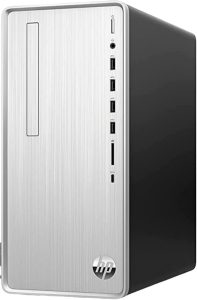
Why this fits Home/Office needs: The HP Pavilion line generally offers a fantastic balance of price and performance. Look for models featuring at least an Intel Core i5 or AMD Ryzen 5 processor, 16GB of RAM, and a fast 512GB NVMe SSD. This configuration will ensure instantaneous boot times and smooth handling of all Office apps, web browsing, and conferencing software without breaking the bank. It also retains the ability to add more storage or RAM later.
Laptops have overtaken desktops as the primary computer for most consumers. The desire to not be tethered to a single desk is a powerful motivator. Modern laptops are marvels of engineering, packing incredible power into thin, light frames.
For home and office use, we are generally looking at “Ultrabooks” or thin-and-light productivity machines, rather than bulky gaming laptops.
1. Ultimate Portability and Flexibility This is the game-changer. A laptop allows you to turn any space into an office. You can finish a report at the kitchen table, answer emails on the couch, take your computer to a client meeting, or work from a hotel room. For hybrid workers splitting time between home and a corporate office, a laptop is essential.
2. All-in-One Simplicity A laptop is a self-contained unit. The screen, keyboard, trackpad, webcam, speakers, and microphone are all integrated. You open the lid, push the power button, and you are ready to work. There is no cable clutter and it takes up minimal space when not in use.
3. Built-in Battery Backup A power outage isn’t a disaster with a laptop. With modern devices offering 8–15 hours of battery life, you can continue working through blackouts or away from outlets for an entire workday.
1. The Performance “Tax” To fit high-end components into a thin chassis, manufacturers must throttle performance to manage heat and preserve battery life. A laptop processor generally cannot sustain peak speeds as long as its desktop counterpart. You also pay a premium for miniaturization; a laptop is almost always more expensive than a desktop with identical specs.
2. Poor Ergonomics (If used alone) Hunching over a 13-inch or 15-inch screen while typing on a cramped keyboard for eight hours a day is a recipe for neck strain and repetitive stress injuries. To use a laptop safely full-time, you really need an external monitor, keyboard, and mouse riser.
3. Virtually Zero Upgradability Modern laptops are increasingly sealed shut. The processor and memory are often soldered directly onto the motherboard. Usually, the only component you might be able to upgrade is the storage drive, and even that is becoming rarer. When a laptop no longer meets your needs, you usually have to replace the entire machine.
4. Durability and Theft Risk Because they move around, laptops are prone to drops, spills, and being sat on. They are also highly attractive targets for theft in public spaces.
You value flexibility above all else. You work in various locations, travel frequently, or simply don’t have the space for a permanent desk setup. You are willing to sacrifice some raw power and upgradability for the freedom to move.
For productivity, you need a great keyboard, a bright screen, excellent battery life, and a lightweight build.
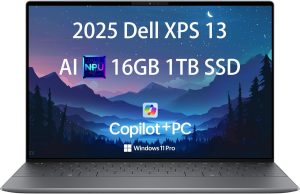
Why this fits Home/Office needs: The Dell XPS 13 is consistently rated as one of the best productivity laptops on the market. It is incredibly thin and light, making it easy to carry around the house or in a bag. The build quality is premium aluminum, the keyboards are excellent for typing all day, and the “InfinityEdge” displays give you a lot of screen space in a small footprint. Aim for an Intel Core i5 or i7 model with 16GB of RAM for a future-proof office machine.
Let’s summarize the battle across the most critical decision factors.
Winner: Desktop.
If your budget is tight, you can build or buy a very capable desktop for significantly less than a comparable laptop. The extra money spent on a laptop goes toward the engineering required to make it portable, not toward making it faster.
Winner: Desktop.
While high-end laptops are powerful, thermal constraints will always limit them. A desktop with cooling fans and better airflow can run its processor at maximum speed indefinitely without overheating. For basic office tasks, the difference is negligible, but for heavy multitasking, the desktop wins.
Winner: Laptop (By a landslide).
If you need to move your computer even once a week, the laptop wins. The ability to close the lid and take your entire digital life with you is a convenience that desktops cannot match.
Winner: Desktop.
If a desktop keyboard breaks, you buy a $20 replacement. If a laptop keyboard breaks, it can be a costly, complex repair. Desktops last longer because they run cooler and parts can be swapped out piecewise over time.
Winner: Desktop (Out of the box).
The separation of screen and keyboard is essential for health. While a laptop can be made ergonomic with accessories, the desktop is designed that way by default.
Many modern home office workers have discovered a third option that bridges the gap: The Laptop Docking Station setup.
This involves buying a powerful laptop (like the Dell XPS recommended above) to serve as your single computer. When you are mobile, you use it as a laptop.
However, on your home office desk, you have a “docking station.” You connect one single cable from the dock to your laptop. That single cable instantly connects your laptop to:
One or two large external monitors.
A full-sized keyboard and mouse.
Ethernet internet.
External speakers.
Power to charge the laptop.
The result? When docked, your laptop effectively becomes a desktop, offering the ergonomic benefits and screen real estate of a tower PC. When you unplug that single cable, you have a fully portable machine with all your files already on it.
While this is often the most expensive route (you have to buy the laptop, plus the monitors and dock), it is highly recommended for anyone who works remotely but also travels or occasionally works from the corporate office.
The decision between a laptop and a desktop for home and office use is no longer about power versus portability—it’s about defining where and how you do your best work.
Choose a Desktop if:
You have a dedicated room or desk where you always work.
You are on a strict budget and want the most performance for your dollar.
You want a machine that is easily repairable and upgradeable for the next 5–7 years.
You require massive amounts of storage space (adding hard drives to desktops is cheap and easy).
Choose a Laptop if:
You value the freedom to work from different rooms, cafes, or offices.
You do not have space for a permanent desk setup.
You want the simplicity of an all-in-one device with no cable clutter.
You are willing to invest in a docking setup later to improve ergonomics at home.
For the average home and office user in 2024, a high-quality laptop often provides the necessary versatility for modern life, especially when paired with an external monitor at home. However, the trusty desktop remains the unbeaten champion of value and long-term reliability for the dedicated workspace.


